Installing Memory Modules <<
Previous Next >> Configuring the System BIOS
Introduction to BIOS, CMOS, and Firmware
When a computer is turned on, the computer’s microprocessor uses a program called the BIOS (basic input/output system) to start the computer system. The BIOS also manages data flow between the computer's operating system and attached/connected devices, such as the hard drive, video adapter, keyboard, mouse, and printer.
開啟計算機後,計算機的微處理器會使用稱為BIOS(基本輸入/輸出系統)的程序來啟動計算機系統。 BIOS還管理計算機操作系統和已連接/已連接的設備(例如硬盤驅動器,視頻適配器,鍵盤,鼠標和打印機)之間的數據流。
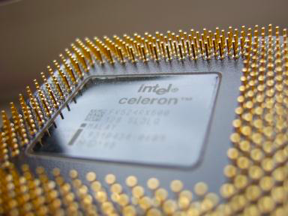
A basic input/output system (BIOS) chip. Photo used under CC-BY-SA license from Uwe Hermann.
A computer’s BIOS is the most common example of firmware. Firmware is software on a chip, and is the first software run by the computer when the machine is booted up. The BIOS has several roles, including performing the power-on self-test, which tests and initializes the processor, video card, disk drives, and adapters. The BIOS also includes the low-level “operating system” for the computer, which allows the computer to take input from and give output to the most basic components, including the keyboard, mouse, and disk drives. The BIOS is stored in a ROM (Read-only memory) chip, but can be upgraded through a process call “flashing.”
While the BIOS is a program that allows the user to make changes to the settings, the settings themselves are stored in the complementary metal-oxide semiconductor, or CMOS. The CMOS is a battery-powered memory chip.
計算機的BIOS是最常見的固件示例。固件是芯片上的軟件,是計算機啟動時計算機運行的第一個軟件。 BIOS具有多個角色,包括執行開機自檢,該自檢將測試並初始化處理器,視頻卡,磁盤驅動器和適配器。 BIOS還包括計算機的低級“操作系統”,它使計算機可以從最基本的組件(包括鍵盤,鼠標和磁盤驅動器)獲取輸入並提供輸出。 BIOS存儲在ROM(只讀存儲器)芯片中,但可以通過過程調用“刷新”進行升級。
BIOS是允許用戶更改設置的程序,而設置本身則存儲在互補金屬氧化物半導體或CMOS中。 CMOS是電池供電的存儲芯片。
Understanding BIOS and CMOS
The BIOS is used to configure common settings, such as the order in which devices are read by the computer. This order is known as the boot order. In addition, the BIOS is also used in the configuration of settings that turn on and off various input/output ports, and the configuration of various CPU settings such asvirtualization and overclocking .
Be very careful when making changes to the BIOS. Incorrect settings may keep your computer from booting.
BIOS用於配置通用設置,例如計算機讀取設備的順序。此命令稱為引導命令。此外,BIOS還用於配置打開和關閉各種輸入/輸出端口的設置,以及各種CPU設置(例如虛擬化和超頻)的配置。
更改BIOS時要非常小心。不正確的設置可能會使您的計算機無法啟動。
.png)
A basic input/output system (BIOS) setup utility. Photo used under CC-BY license from OI123.
BIOS configures the following settings:
- Boot order
- Storage devices (USB drives, hard drives, floppy drives, optical drives)
- Built-in ports (SATA, eSATA, PATA, USB, IEEE-1394, serial, parallel, PS/2)
- AGP, PCI, PCIe slots
- Integrated chipsets (audio, video, network)
- Virtualization
- Clock speed
- Memory (RAM)
- Power management
- Intrusion detection
- Passwords and encryption
- PC health tools (temperature, voltage, etc.)
- Direct access to the web or other services without booting computer (UEFI specific)
When the power button is pressed on the computer, the first step in the boot process is the power-on self-test, called the POST. Once a successful POST occurs, the BIOS reads the settings from the CMOS, and the BIOS looks for an operating system from the configured boot devices. Once it finds the operating system, the operating system’s boot loader begins the operating system boot process, and turns over control of the computer to the operating system.
BIOS配置以下設置:

引導順序
存儲設備(USB驅動器,硬盤驅動器,軟盤驅動器,光盤驅動器)
內置端口(SATA,eSATA,PATA,USB,IEEE-1394,串行,並行,PS / 2)
AGP,PCI,PCIe插槽
集成芯片組(音頻,視頻,網絡)
虛擬化
時鐘速度
記憶體(RAM)
能源管理
入侵檢測
密碼和加密
PC健康工具(溫度,電壓等)
直接訪問Web或其他服務,而無需啟動計算機(特定於UEFI)
當按下計算機上的電源按鈕時,引導過程的第一步是開機自檢,稱為POST。成功進行POST後,BIOS將從CMOS中讀取設置,然後BIOS從已配置的引導設備中尋找操作系統。找到操作系統後,操作系統的引導加載程序將開始進行操作系統引導過程,並將計算機的控制權移交給操作系統。
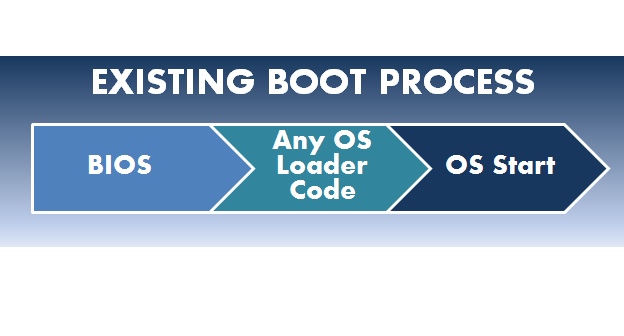
The boot process:
- Power on computer.
- BIOS performs power-on self-test (POST).
- BIOS reads settings from CMOS.
- BIOS looks for operating system from configured boot device.
引導過程: 打開計算機電源。 BIOS執行開機自檢(POST)。 BIOS從CMOS讀取設置。 BIOS從配置的引導設備中查找操作系統
Installing Memory Modules <<
Previous Next >> Configuring the System BIOS